We use essential cookies to keep you signed in, and — only with your OK — analytics cookies to see how Chronio is used. See our Privacy Policy.
The structure behind the week.
Chronio isn't a stopwatch with extra steps. Every hour you track ties back to a pillar you chose, a goal you set, and a plan you can check yourself against.
Pillars hold goals. Goals hold activities.
A pillar is a part of your life you've decided matters: Health, Learning, whatever you call it. Inside it, a goal is AIM or LIMIT, with a weekly target. An activity is the actual thing you log time against, and it can carry its own tasks and saved resources. Chronio doesn't decide any of this for you. It just holds you to what you already defined.
Only want to quit or keep one habit? Skip the structure and add a tracker: it counts the days since, your clean runs and your streak.
However it gets logged, it lands in the same place.
One tap for precision. A quick save when there isn't time. Say it out loud and let Chronio's voice logger file it. Or tell your own Claude or ChatGPT what happened through the MCP connector, and it writes the entry for you.
- Pause and resume a timer without losing the thread.
- Save an article, video or course into the right activity without leaving the page.
- Log by voice: speak or paste "ran 30 minutes, 20 push-ups" and confirm the rows Chronio pulls out.
- Ask your own Claude or ChatGPT to log time, or import a whole week in plain English.
Added task: redo problem set 4, due tomorrow.
Capture time and reading without leaving the page.
The extension puts Chronio's structure one click away from wherever you already are, mid-article, mid-video, mid-anything. No app switch, no re-typing what you were just looking at.
- Every save starts with Pillar → Goal → Activity chosen up front, nothing lands in a generic inbox to sort out later.
- The popup remembers what's running: pause, resume or stop a timer from any tab, exactly where you left off.
- Land on a page you've already saved and Chronio offers to pick tracking back up, so time doesn't slip by unlogged.
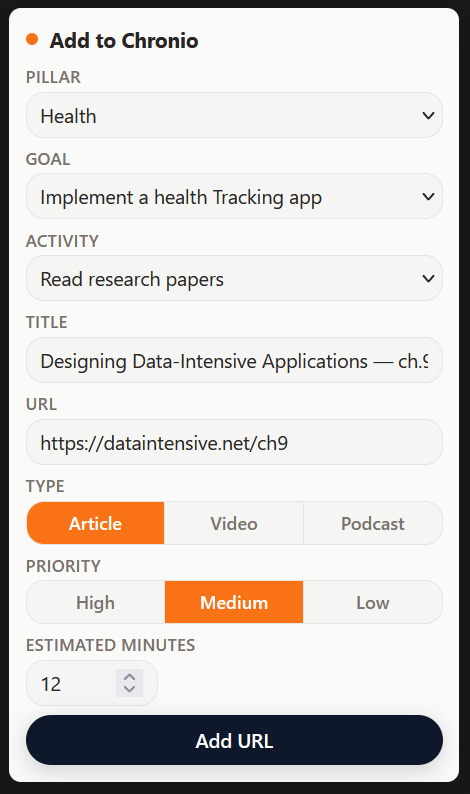
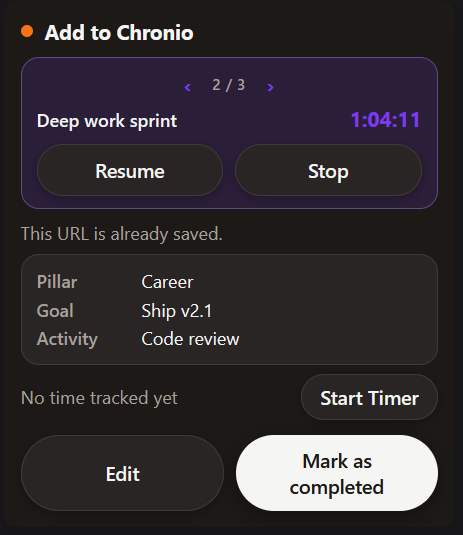
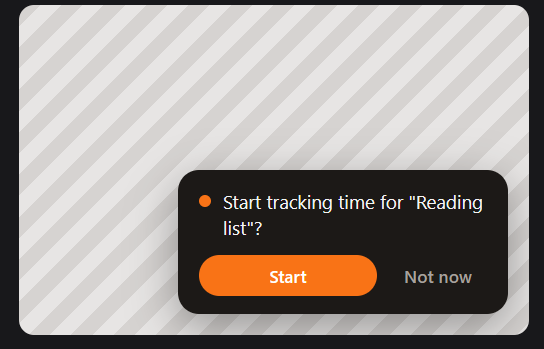
Save it now. It lands inside the goal it's for.
Articles, videos, podcasts, courses and books all live in one place, saved straight from the browser extension without leaving the page you're on. Every item belongs to a specific activity, never a generic pile. Rate it and leave a reflection once it's done, and it becomes part of that goal's actual story.
- Save a page, a video or a course into the right activity in one click.
- Track estimated time and status while you work through it.
- Leave a rating and a reflection when you finish. Future you gets the context.
Your notes, linked to Notion or kept right here.
Every saved item can carry its own notes and quotes as you go. Prefer Notion? Link an item to a page there instead, create one from scratch or connect an existing one, and jump back with one click.
- Quote a passage or jot your own note, right on the item you saved.
- Link a Notion page instead, new or existing, one click back to it.
- One-way by design. Chronio stays the source of truth, nothing gets quietly overwritten elsewhere.
Journal. A separate daily timeline: what you tracked that day, plus a short morning or evening reflection, your top focus, your top priorities, and a nudge toward whatever would actually move things.
A plan with weeks in it, not just a goal.
A program is a time-boxed plan toward one goal: six weeks of strength training, a 90-day job search, broken into weekly tasks. Build one yourself, or describe what you want to Chronio's AI planning assistant and let it draft the whole thing.
- Pick a coach style, strict, friendly, or supportive, and it shapes how ambitious the plan is.
- The assistant can create the pillar, goal, activity, tasks and weekly targets for you. Every step can be undone.
- Push a program to Trello as a board, one list per week, one card per task. Chronio stays the source of truth.
The gap, made visible.
A consistency grid shows what actually got touched each day. Planned-vs-actual marks where intention and reality diverged, calmly, without a lecture. Underneath, a week analysis, a productivity trend, per-goal charts and a library report show the same week from every other angle. The app itself will also nudge you: a ranked list of the single best few minutes you could spend right now, based on what would actually move your score, not just what looks biggest.
Here's what that looks like for a founder's week, two months into fundraising:
See your own week take shape.
Set up your pillars, plan a week, and watch the pace fill in for real.
Free during beta · Export anytime · No screen spying